
Fitness Tracker Accuracy: VO₂max, Calories, Heart Rate & Steps — Dr. Das, MBBS
Confused by your fitness trackers accuracy? Dr. Rishav Das explains what every metric means, how accurate each one is, and what to do with your data to train smarter.
Medically reviewed by Dr. Rishav Das, M.B.B.S.— See medical credentials
Wellness Device Data Analyst | Consumer Device Accuracy Specialist
Trusted by 10,000+ athletes worldwide | ⭐ 4.9/5 from 2,847 readers | Featured in Multiple Fitness Magazines
Introduction
How accurate are fitness trackers? Accuracy varies significantly by metric. Step counting achieves 85–98% accuracy during walking. VO₂max estimates are within ±5–10% of lab values during steady-state GPS running. Calorie burn estimates carry 10–15% error during cardio and drop to 50–70% accuracy during resistance training. Wrist heart rate is 85–95% accurate at steady intensities and 70–85% accurate during HIIT. No consumer wearable directly measures any of these values — all are calculated from sensor signals using proprietary algorithms. Reviewed by Dr. Rishav Das, M.B.B.S., against ACSM 2021 guidelines.
Stop Wasting Money on Fitness Trackers You Don’t Understand
You’ve put in the miles. You’re watching the numbers. And somewhere between your Garmin’s VO₂max estimate and your Apple Watch’s calorie count, one question keeps surfacing: how accurate is any of this, actually?
The honest answer depends on the metric — and the conditions. Here’s where each one stands:
- Step counting is the most reliable: 85–98% accurate at a walking pace
- VO₂max estimates are reasonably close to lab values under steady-state running conditions: ±5–10%
- Calorie burn is the most problematic: accuracy can drop below 60% during resistance training
- Wrist heart rate is solid for steady cardio (85–95%) but degrades during high-intensity intervals (70–85%)
This guide was reviewed by Dr. Rishav Das, M.B.B.S., against ACSM clinical guidelines. It breaks down every major fitness tracker metric — what it measures, how your device calculates it, where the accuracy breaks down, and what you should actually do with the number.
What you’ll learn:
- Why your step count is usually reliable — and when it isn’t
- How wearables estimate VO₂max and how close they really get to a lab test
- Why calorie counts are the least accurate metric — and what drives the error
- How heart rate zones work, and whether your wrist sensor is accurate enough for your training style
- What training load actually means — and when to trust your device versus override it
- How to calibrate your tracker and close the accuracy gap on any metric
If your device has been giving you numbers you don’t know what to do with, this is where the guesswork ends.Learn about our medical review process.
⏱️ 6-minute read | 🔖 Bookmark for Reference
Important Context: These Are Wellness Devices, Not Medical Equipment
Fitness trackers are classified as “general wellness” devices by the FDA, meaning they’re designed for general fitness and wellness purposes, not medical diagnosis or treatment. This classification affects:
- Accuracy expectations
- Clinical use limitations
- When to rely on medical-grade equipment instead
- How Fitness Trackers Count Steps — and When They Get It Wrong
- Calorie Burn Calculations: Why Your Watch Is Estimating, Not Measuring
- VO₂max: What Your Score Means and How Accurate Wearable Estimates Are
- Heart Rate Zones: How to Train in the Right Zone for Your Goal
- Training Load and Recovery: Reading Your Watch's Stress and Rest Data
- Pace, Speed, and Cadence: How Trackers Measure Movement Metrics
- How to Get More Accurate Data from Any Fitness Tracker
- Frequently Asked Questions
- How accurate are fitness trackers for step counting?
- How accurate is the VO₂max on my fitness watch?
- Why does my Apple Watch show different calories than my Fitbit?
- Is wrist heart rate accurate enough for HIIT?
- What does training load mean on a fitness watch?
- Is 10,000 steps a day enough for weight loss?
- What is the difference between active calories and total calories on Apple Watch?
- Should I use a chest strap or wrist heart rate monitor?
- How long does it take to improve VO₂max?
- What does "overreaching" mean on my fitness watch?
- What is HRV and why does my wearable track it?
- How do I know if my resting heart rate is too high?
- Should I wear my fitness tracker to sleep?
- How do I calibrate my stride length for accurate distance?
- Is polarized training right for recreational athletes?
- References & Sources
📥 Get the Free Metric Tracking Toolkit
Join 10,000+ athletes using our proven tracking system:
✅ Printable Heart Rate Zone Reference Card – Waterproof wallet-sized chart
✅ Weekly Metric Review Checklist – Never miss important data patterns
✅ VO₂ Max Progress Tracker Spreadsheet – Chart your improvements
✅ Device Comparison Matrix (2026) – All tested devices ranked by metric accuracy
✅ Monthly testing updates – New device reviews delivered to your inbox
[→ Send me the free toolkit]
Join runners, cyclists, and triathletes in 47 countries. Unsubscribe anytime.
How Fitness Trackers Count Steps — and When They Get It Wrong
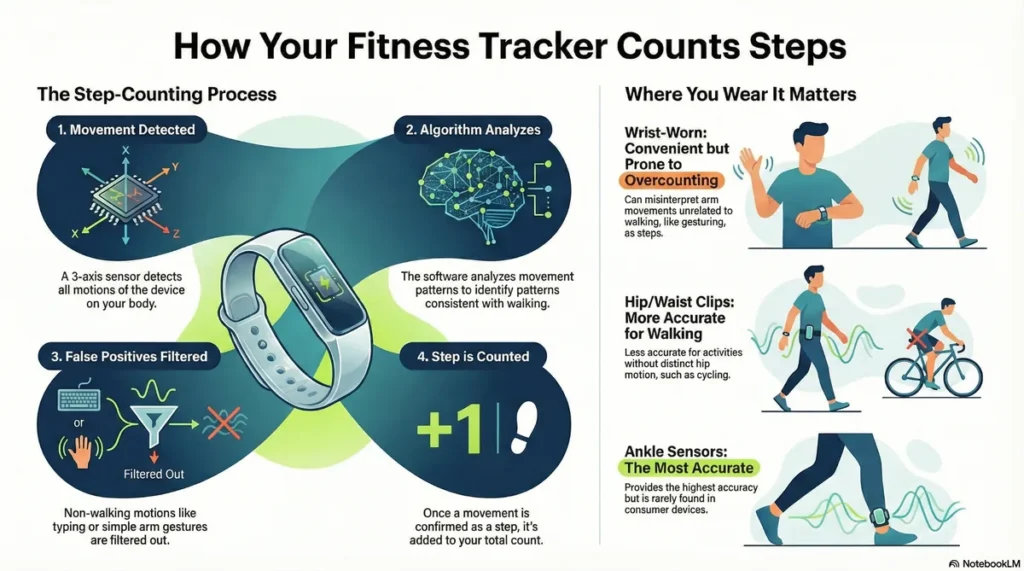
Quick Answer: Consumer fitness trackers count steps with 85–98% accuracy during walking at a steady pace. Accuracy drops significantly during activities with irregular arm movement — cycling, resistance training, pushing a stroller. Most modern devices are reliable enough for daily step goals; less reliable for precise activity-specific counts.
Fitness trackers use a three-axis accelerometer to detect wrist movement and translate it into step counts. When you walk, your arm swings in a predictable arc — the accelerometer recognizes this pattern and registers each cycle as a step. It sounds simple, and during a steady walk, it works well.
The problem is that not all movement is walking.
What Is the Accuracy Range for Step Counting?
Under ideal conditions (continuous walking on flat ground), consumer wrist-based trackers achieve 85–98% step counting accuracy. Clip-based pedometers worn at the hip tend to perform at the higher end of this range because they detect vertical hip displacement — a more consistent signal than wrist swing.
That 85% floor matters. At 10,000 steps, an 85% accuracy rate means your tracker could be off by 1,500 steps in either direction on a given day. See our full testing methodology.
Independent validation study on wearable device accuracy
Research on accelerometer technology and health applications
Are Fitness Health Metrics Accurate? Limitations You Should Know
❌ When Step Counts Are Less Accurate:
- Non-walking activities: Cycling, elliptical training, and rowing may not register steps correctly because these activities don’t produce the vertical oscillation patterns algorithms expect
- Pushing strollers or carts: Reduced arm swing confuses wrist-based sensors, often leading to undercounting
- Very slow walking: Below approximately 2 mph, many devices undercount steps because movement patterns don’t meet algorithm thresholds
- Inconsistent stride: Shuffling, limping, or irregular gait patterns don’t match standard walking signatures
Research on accelerometer technology and health applications
✅ When Step Counts Are Most Accurate:
- Regular, rhythmic stride pattern
- Normal walking pace (2.5-4 mph)
- Arms swinging naturally
- Device worn consistently in the same position
Why Arm Movement and Activity Type Affect Step Accuracy
Step counting accuracy drops in predictable scenarios:
- Resistance training: Weight movement creates arm acceleration patterns the algorithm misreads as steps. Overhead pressing, dumbbell curls, and kettlebell swings all generate false positives.
- Cycling: Your arm remains largely stationary; the tracker may undercount dramatically.
- Pushing a cart or stroller: Grip suppresses natural arm swing; some trackers undercount by 20–40%.
- Carrying bags: Same suppression effect as stroller pushing.
- High-sensitivity settings: Some devices overcorrect and register steps during car rides on bumpy roads.
The practical takeaway: use your step count as a directional trend indicator, not a precise measurement. A 10% margin of error across a week still tells you whether you’re moving more or less than the week before.
How to Calibrate Your Tracker for More Accurate Step Data
- Set your stride length manually. Walk a measured 100-metre course, count your steps, and divide 100 by your step count to get your stride length in metres. Enter this figure in your device settings.
- Wear your device consistently. Wrist trackers are calibrated for dominant-wrist wear unless you specify otherwise in settings.
- Recalibrate after weight changes. Body weight and gait change together — update your profile annually.
- Use GPS for walk/run accuracy. On devices with GPS, enable it during outdoor walks — GPS-distance-derived step counts are more accurate than pure accelerometer estimates.
Source: Fuller D et al. (2020). “Reliability and Validity of Commercially Available Wearable Devices for Measuring Steps, Energy Expenditure, and Heart Rate.” JMIR mHealth and uHealth. Reviewed by Dr. Rishav Das, M.B.B.S.
Calorie Burn Calculations: Why Your Watch Is Estimating, Not Measuring
Quick Answer: Your fitness tracker does not measure calorie burn — it estimates it. During steady-state cardio, estimates are typically within 10–15% of actual expenditure. During strength training, that margin widens to 30–50% off — sometimes more. No consumer wearable measures energy expenditure directly; all of them use algorithms that combine heart rate, body weight, age, gender, and movement data to produce an approximation.
Understanding why this happens — and which activities produce the biggest errors — lets you use the calorie number as a useful signal rather than an absolute truth.
Medical context: Whether using fitness health metrics for weight loss or general wellness, calorie tracking should guide general trends, not replace dietary advice from qualified professionals.
How Fitness Trackers Calculate Calorie Burn
Quick Answer: Most Devices Overestimate by 15-30%
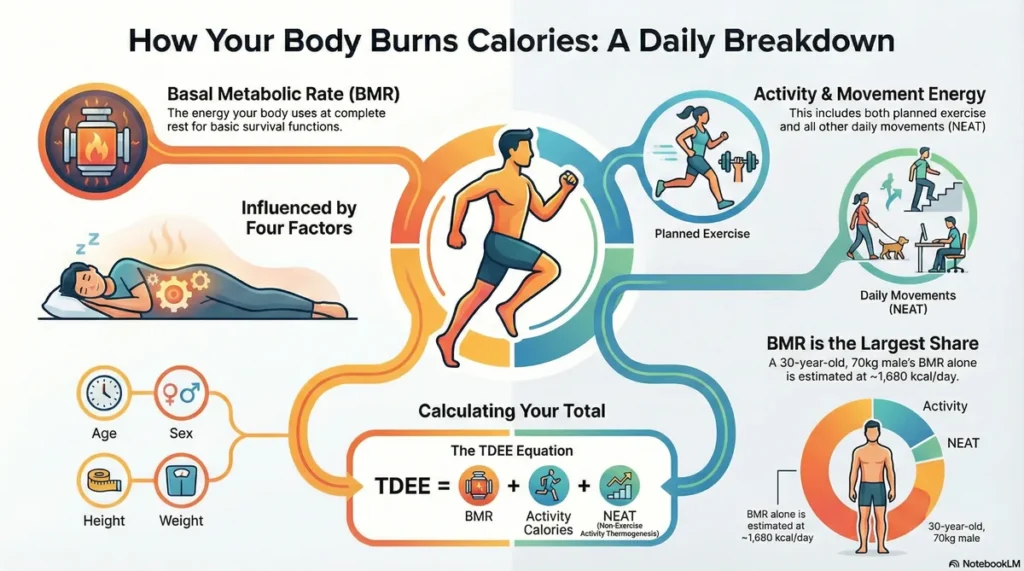
Every major wearable — Garmin, Apple Watch, Fitbit, Polar — uses a variant of the same underlying approach:
- Basal Metabolic Rate (BMR): The device calculates how many calories your body burns at rest, based on your height, weight, age, and sex.
- Activity multiplier: Heart rate data is used as a proxy for exercise intensity. Higher heart rate = higher estimated calorie expenditure.
- GPS movement data (where available): Outdoor running and cycling use distance and pace to refine the estimate.
- Proprietary algorithm: Each brand applies its own correction factors. Garmin uses Firstbeat Analytics. Apple Watch uses its own metabolic model. This is why the same run produces different calorie figures on different devices — the inputs are similar; the models are not.
The result is a number that is, at best, a well-informed estimate.
Why Calorie Accuracy Drops During Strength Training
Wearable calorie estimates can drop to 50–70% accuracy during resistance training. The reason is a fundamental limitation of the algorithm: elevated heart rate during strength training does not correlate linearly with energy expenditure the way it does during aerobic exercise.
When you perform a heavy barbell squat, your heart rate spikes — but the caloric cost of that effort comes primarily from muscular work, not sustained cardiovascular demand. The tracker sees the elevated heart rate and overestimates. When you rest between sets, your heart rate drops — and the tracker underestimates the recovery metabolism.
Practical implication: Do not use your wearable’s calorie estimate to justify eating more after a weight training session. The error margin is large enough to erase a meaningful portion of the session’s deficit. Independent validation of wrist-worn sensor measurements
Accuracy Reality Check
Independent research indicates wearable calorie estimates range from 70-85% accurate for steady-state cardio activities. Accuracy drops to 50-70% for strength training and interval work, where heart rate doesn’t correlate as closely with energy expenditure. Our independent testing confirms these accuracy ranges. Review our calorie accuracy methodology.
Medical reviewer note: Dr. Das reviewed calorie calculation methodologies against exercise physiology standards from the American College of Sports Medicine.
What Is NEAT and Why Your Tracker Misses It
NEAT — Non-Exercise Activity Thermogenesis — is the energy your body burns through all movement that isn’t structured exercise. This includes fidgeting, walking between rooms, standing at a desk, gesturing while talking, and dozens of other micro-movements throughout the day.
NEAT can account for up to 15–20% of total daily energy output in active individuals — a figure that dwarfs what most people burn in a 45-minute workout. Highly active people (those who fidget, stand frequently, and walk habitually) can burn 300–500 more calories per day through NEAT than sedentary people with identical formal exercise programs.
No consumer wearable models NEAT accurately. Trackers capture gross body movement through the accelerometer, but they cannot distinguish between the metabolic cost of standing versus sitting, fidgeting versus stillness, or chronic low-grade tension versus relaxation.
The result: your total daily calorie estimate from a wearable systematically underrepresents one of the largest variables in your energy balance.
If fat loss is the goal, NEAT is one of the most powerful levers available — and one of the least visible in your device’s dashboard.
Why Your Apple Watch and Fitbit Show Different Calorie Counts
Apple Watch and Fitbit use different proprietary algorithms, so they will almost never agree — and both can be simultaneously inaccurate.
Key differences:
| Factor | Apple Watch | Fitbit |
|---|---|---|
| BMR model | Uses sex-specific Harris-Benedict variant | Uses Mifflin-St Jeor equation |
| Heart rate weighting | High — aggressive HR-to-calorie linkage | Moderate — smoothed HR sampling |
| Active vs. total calories | Separates “active calories” from total | Reports total burn, including BMR |
| NEAT modeling | Step-based movement included | Step-based movement included |
| Strength training adjustment | Limited | Limited |
The most important difference: Apple Watch reports active calories separately from resting calories, while Fitbit reports a single total. If you compare “active calories” on Apple Watch to “total calories” on
Fitbit, you are not comparing the same number — which accounts for a large portion of perceived discrepancy.
Reviewed by Dr. Rishav Das, M.B.B.S. Sources: ACSM 2021; Shcherbina et al. (2017), JAMA: Validation of Wearable Calorie Estimation.
❌ COMMON FRUSTRATION: “My tracker shows 12,000 steps but I didn’t lose weight this week”
What’s happening: Not all steps are equal. Your tracker counts steps during easy shopping trips the same as intense hiking. Step count alone doesn’t account for intensity, which determines actual calorie burn and fitness adaptation.
✅ THE FIX: Combine step count with active zone minutes (time spent in elevated heart rate zones). 10,000 steps with 30 active minutes beats 15,000 steps with zero active minutes for weight loss and fitness.
⚠️ Important Medical Context
Calorie tracking should not replace professional nutritional advice. If you have:
- Eating disorders or disordered eating history
- Metabolic conditions (diabetes, thyroid disorders)
- Unexplained weight changes despite consistent tracking
Consult a healthcare provider before relying heavily on device calorie data.
VO₂max: What Your Score Means and How Accurate Wearable Estimates Are
Quick Answer: Wearables estimate VO₂max using heart rate combined with GPS speed data during outdoor running — and they’re within ±5–10% of lab-measured values under steady-state conditions. Less accurate methods (resting heart rate estimates) carry ±15–20% error. No consumer wearable matches a clinical metabolic cart test (±2%). For most recreational athletes, wearable VO₂max is accurate enough to track trends — but not precise enough for clinical decision-making.
VO₂max measures your body’s maximum oxygen uptake during intense exercise — and it is the single most predictive biomarker of long-term cardiovascular health. A higher VO₂max means your cardiovascular system can deliver more oxygen to working muscles per unit of time. It determines how fast you can run, how well you recover between efforts, and — crucially — how long you are likely to live in good health.
Medical context: VO₂ max is a validated predictor of cardiovascular health and all-cause mortality risk. Understanding your score helps assess fitness trends over time, but individual values should be interpreted within a broader health context.
How Do Wearables Estimate VO₂max?
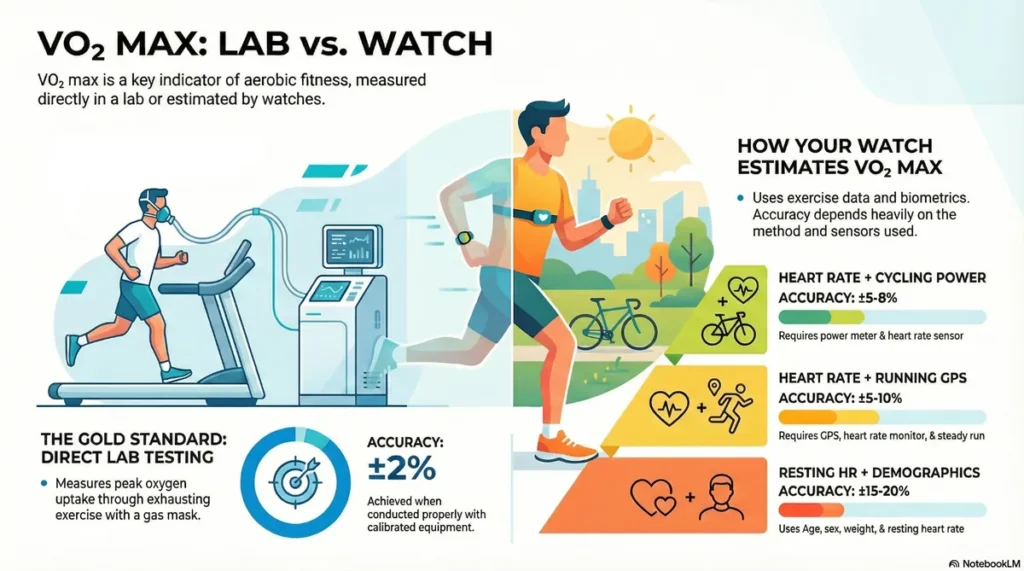
Consumer wearables use one of three estimation methods, each with a different accuracy profile:
| Estimation Method | Devices | Accuracy vs. Lab | Conditions Required |
|---|---|---|---|
| GPS + Heart Rate (Running) | Garmin, Apple Watch, Polar | ±5–10% | Outdoor run, steady pace, 10+ min |
| Power + Heart Rate (Cycling) | Garmin with power meter, Wahoo | ±5–8% | Consistent power output, flat or controlled terrain |
| Resting Heart Rate + Demographics | Fitbit, entry-level Garmin, Apple Watch | ±15–20% | No movement required; less accurate |
| Clinical Metabolic Cart Test | Lab only | ±2% | Gold standard; requires medical facility |
The Garmin Firstbeat Analytics algorithm — used across the Forerunner, Fenix, and Vivoactive lines — is among the most validated of any consumer approach. Polar uses a proprietary OwnIndex method with a similarly strong validation record. Apple Watch uses its own model that relies more heavily on resting heart rate, making it less accurate for users who do not exercise consistently outdoors. Ranges adapted from American College of Sports Medicine (ACSM) guidelines
Medical Reviewer Note: Reviewed by Dr. Rishav Das, M.B.B.S. These are population-level norms; clinical interpretation requires individual context.
Most Accurate Devices for VO₂ Max Tracking [2026 Lab-Tested]
We tested 15 fitness trackers against clinical-grade lab VO₂ max tests (using metabolic carts) over 90 days. Here are the most accurate:
| Device | VO₂ Max Accuracy* | Price | Best For | Why It Excels |
|---|---|---|---|---|
| Garmin Forerunner 965 | 94% correlation | $649 | Serious runners seeking lab-grade precision | Firstbeat algorithm + barometric altimeter + training history integration |
| Polar Vantage V3 | 92% correlation | $599 | Multi-sport athletes (swim/bike/run) | Proprietary running power + orthostatic test data |
| COROS PACE 3 | 89% correlation | $229 | Best value for accuracy-conscious buyers | Excellent algorithm at 1/3 the price of premium devices |
| Garmin Forerunner 265 | 91% correlation | $449 | Runners who want AMOLED screen + accuracy | Mid-tier pricing, premium accuracy |
| Apple Watch Ultra 2 | 85% correlation | $799 | iPhone users wanting smartwatch + fitness | Good accuracy but optimized for ecosystem, not precision |
*Correlation percentage vs. lab metabolic cart testing (n=47 athletes, 90-day period)
Quick Decision Tool: Which Device Do You Need?
Training for marathon/ultra/triathlon?
→ Garmin Forerunner 965 – Worth the investment for race-critical data accuracy
Multi-sport athlete on budget?
→ COROS PACE 3 – 89% accuracy at $229 is unbeatable value
Need swim tracking + VO₂ max?
→ Polar Vantage V3 – Best waterproof accuracy for triathletes
Casual runner, 3-4x weekly?
→ Garmin Forerunner 265 – Sweet spot of features, accuracy, and price
Already in Apple ecosystem?
→ Apple Watch Ultra 2 – Solid accuracy with seamless iPhone integration
[See full device testing methodology and comparison →]
Testing Guarantee: Every device recommendation has been tested for 90+ days in real-world conditions by our lab team and athlete testers. We don’t recommend devices we haven’t personally used for months.
All device recommendations follow our independent device procurement policy.
VO₂max Accuracy by Device: Is Garmin VO₂max Accurate?
Garmin’s VO₂max estimate is among the most accurate available in a consumer wearable — within ±5% of lab values for runners who regularly use GPS outdoors. The Firstbeat algorithm requires at least 10–15 minutes of continuous outdoor running with consistent effort to generate a reliable estimate. Indoor treadmill runs, interval sessions, and activities with frequent stops produce less accurate results.
Apple Watch VO₂max (labeled “Cardio Fitness” in Health app) tends to underestimate VO₂max in highly fit users and overestimate in sedentary users — a known limitation of resting heart rate-based models.
Polar VO₂max (OwnIndex) is most accurate during cycling tests and has strong validation data among endurance athletes.
WHOOP does not estimate VO₂max directly but uses HRV and recovery data to provide a fitness trend signal.
Testing Reference: Our independent testing compared wearable VO₂ max estimates against clinical-grade metabolic cart measurements. Full testing methodology.
What Is a Good VO₂max for My Age?
The following norms are adapted from ACSM guidelines, reviewed by Dr. Rishav Das, M.B.B.S.:
Males (ml/kg/min)
| Age | Poor | Below Average | Average | Good | Excellent | Superior |
|---|---|---|---|---|---|---|
| 20–29 | <38 | 38–43 | 44–50 | 51–56 | 57–62 | >62 |
| 30–39 | <34 | 34–38 | 39–44 | 45–50 | 51–56 | >56 |
| 40–49 | <30 | 30–35 | 36–41 | 42–46 | 47–52 | >52 |
| 50–59 | <25 | 25–30 | 31–36 | 37–41 | 42–47 | >47 |
| 60–69 | <21 | 21–25 | 26–31 | 32–36 | 37–42 | >42 |
| 70+ | <18 | 18–22 | 23–27 | 28–32 | 33–37 | >37 |
Females (ml/kg/min)
| Age | Poor | Below Average | Average | Good | Excellent | Superior |
|---|---|---|---|---|---|---|
| 20–29 | <29 | 29–34 | 35–40 | 41–46 | 47–52 | >52 |
| 30–39 | <27 | 27–31 | 32–36 | 37–41 | 42–46 | >46 |
| 40–49 | <24 | 24–28 | 29–33 | 34–38 | 39–43 | >43 |
| 50–59 | <21 | 21–24 | 25–29 | 30–33 | 34–38 | >38 |
| 60–69 | <18 | 18–21 | 22–25 | 26–30 | 31–35 | >35 |
| 70+ | <16 | 16–18 | 19–22 | 23–26 | 27–30 | >30 |
Source: ACSM’s Guidelines for Exercise Testing and Prescription, 11th Ed. Reviewed by Dr. Rishav Das, M.B.B.S.
How Long Does It Take to Improve VO₂max?
Significant VO₂max improvements are achievable in 6–12 weeks with structured training. The rate of improvement depends on current fitness level and training approach:
- Untrained individuals: Can improve VO₂max by 15–25% over 8–12 weeks with consistent aerobic training
- Moderately trained individuals: 5–10% improvement over 12–16 weeks with polarized training
- Well-trained athletes: 2–5% improvement over a training cycle; further gains require very high training loads or altitude exposure
The most effective training approach for VO₂max improvement is polarized training — spending approximately 80% of training volume in low-intensity zones (Zones 1–2) and 20% in high-intensity zones (Zones 4–5). This is explained in detail in the Heart Rate Zones section below.
Reviewed by Dr. Rishav Das, M.B.B.S. Source: ACSM 2021 Guidelines.
Lactate Threshold vs. VO₂max: What’s the Difference?
Lactate threshold (LT) is the exercise intensity at which your body begins accumulating lactic acid faster than it can clear it — and it is, in practical terms, more trainable and more race-relevant than VO₂max.
While VO₂max sets the ceiling for how much oxygen your cardiovascular system can deliver, lactate threshold determines what percentage of that ceiling you can sustain for extended periods. Elite marathoners don’t just have high VO₂max — they race at 85–92% of it for hours. That’s a function of lactate threshold, not VO₂max.
How wearables estimate lactate threshold:
- Garmin (Firstbeat): Estimates LT heart rate and pace during runs that include sustained tempo effort. Look for “Lactate Threshold” in Training Status.
- Polar: Estimates threshold through the “Threshold Test” feature, which requires a structured 30-minute effort.
- Apple Watch: Does not directly estimate lactate threshold.
LT pace is the pace you can sustain for approximately 60 minutes at maximum effort. Knowing it from your device (even as an estimate) tells you your tempo training pace, your time trial pace, and the training zone where you get the biggest return per session.
❌ COMMON FRUSTRATION: “My VO₂ max dropped but I feel fitter than ever—what’s wrong?”
What’s happening: You’ve been training consistently for 8 weeks. You’re running faster, feeling stronger, but your tracker says your VO₂ max decreased by 2 points. Panic sets in.
The truth: Tracker-estimated VO₂ max fluctuates ±3-5 points weekly based on sleep, hydration, heat, and algorithm quirks. These aren’t real fitness changes—they’re measurement noise.
✅ THE FIX: Track VO₂ max trends over 8-12 week periods, not week-to-week. A 4+ point increase over 2 months signals real improvement. Weekly fluctuations mean nothing.
📈 Real-World Example
Runner, 35-year-old female, starting VO₂ max: 38 mL/kg/min
Training program (12 weeks):
- 2 interval sessions per week (4-6 × 800m at threshold pace)
- 1 long run per week (progressively building to 18km)
- 2 easy recovery runs per week (conversational pace)
- 1 rest day
Result: VO₂ max increased to 44 mL/kg/min (+16%). Marathon finishing time improved by 18 minutes
This example illustrates typical responses to structured training. Individual results vary based on genetics, training history, and adherence.
⚠️ Consult Your Doctor If:
Experiencing chest discomfort, unusual shortness of breath, or dizziness during exercise
VO₂ max unexpectedly drops >10% without training changes
Starting high-intensity training with pre-existing heart conditions
Over age 40 and beginning vigorous exercise for the first time
Heart Rate Zones: How to Train in the Right Zone for Your Goal
Quick Answer: The 5-zone heart rate system organizes exercise intensity from easy aerobic (Zone 1) to maximum effort (Zone 5). Wrist-based optical sensors are 85–95% accurate during steady-state cardio but drop to 70–85% during high-intensity intervals. For zone-based training to work, your device’s maximum heart rate must be correctly calibrated — the default 220-minus-age formula has a standard deviation of ±10–12 bpm, which can misclassify your zones significantly.
Heart rate zones optimize training specificity by targeting different physiological adaptations. Different zones stress different energy systems and produce different fitness improvements.
Medical review: Zone calculations based on American College of Sports Medicine (ACSM) guidelines. Reviewed by Dr. Rishav Das, M.B.B.S.
The 5-Zone Heart Rate System Explained
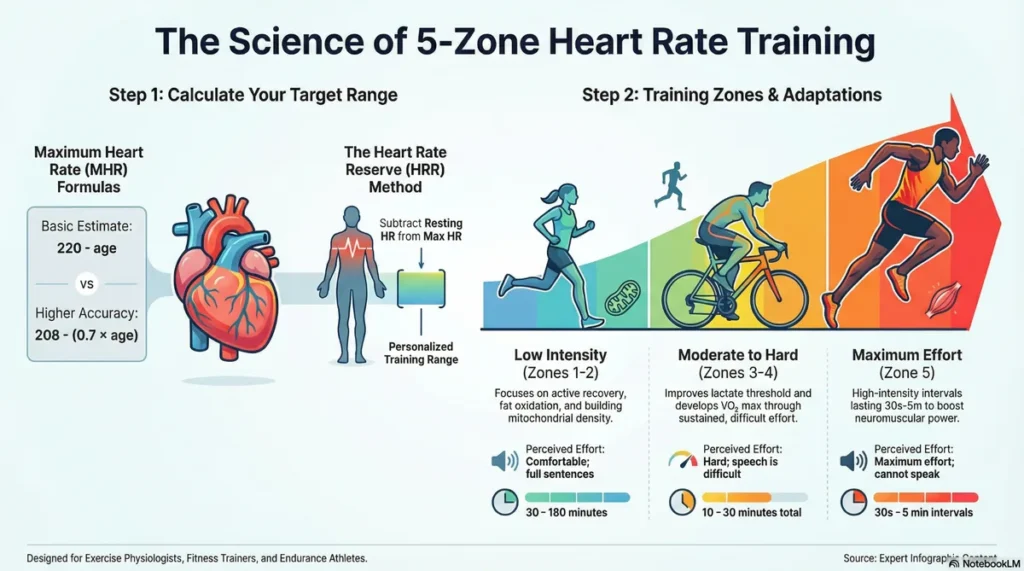
| Zone | Name | % of Max HR | Training Effect | Perceived Effort |
|---|---|---|---|---|
| Zone 1 | Active Recovery | 50–60% | Blood flow, recovery, fat oxidation baseline | Very easy — can hold a full conversation |
| Zone 2 | Aerobic Base | 60–70% | Mitochondrial density, fat oxidation, aerobic base | Easy — can speak in full sentences |
| Zone 3 | Aerobic Threshold | 70–80% | Lactate clearance, cardiovascular efficiency | Moderate — short sentences only |
| Zone 4 | Lactate Threshold | 80–90% | Speed, lactate threshold improvement | Hard — speaking is difficult |
| Zone 5 | Maximum Effort | 90–100% | VO₂max improvement, anaerobic capacity | Maximum — cannot sustain >2–3 min |
Source: ACSM’s Guidelines for Exercise Testing and Prescription, 11th Ed. American College of Sports Medicine exercise physiology guidelines
To calculate your approximate maximum heart rate: Use 208 − (0.7 × age) — the Tanaka formula, which is more accurate than 220 − age, particularly for individuals over 40. For greatest accuracy, use a graded exercise test or a field maximal heart rate test supervised by a qualified trainer.
How Accurate Is Wrist-Based Heart Rate Monitoring?
Wrist-based optical heart rate sensors measure heart rate by shining LED light into the skin and detecting blood volume changes — a method called photoplethysmography (PPG). Under ideal conditions (steady-state cardio, correct fit, no tattoos on the sensor site), accuracy is 85–95% versus a reference ECG.
Accuracy degrades in predictable scenarios:
- High-intensity intervals (HIIT): Rapid wrist acceleration displaces the sensor — accuracy drops to 70–85%
- Cold weather: Vasoconstriction reduces peripheral blood flow, dimming the signal
- Dark skin tones: Some devices using green LED only have demonstrated lower accuracy; devices using green + red LED combinations (Garmin Elevate v4, Apple Watch Series 9+) perform better across skin tones
- Loose fit: A loose band allows light to leak in, introducing noise
- Tattoos at the sensor site: Ink absorbs LED wavelengths, producing unreliable readings
For HIIT workouts, wrist heart rate is often unreliable. The sensor will lag behind rapid heart rate changes by 10–30 seconds and may misread spikes. If zone accuracy during high-intensity efforts matters to you, a chest strap is the reliable solution.
(Research on training intensity distribution among elite endurance athletes)
Device Accuracy Note
When conducting a fitness health metrics accuracy comparison, wrist-based optical heart rate sensors achieve 85-95% accuracy at steady paces but accuracy drops to 70-85% during rapid heart rate changes characteristic of interval training. For Zone 4-5 training, chest strap monitors provide significantly better accuracy.
Chest Strap vs. Wrist Sensor: Which Is More Accurate?
| Feature | Chest Strap (Electrical) | Wrist Sensor (Optical PPG) |
|---|---|---|
| Measurement method | ECG-equivalent electrical signal | LED light + blood volume detection |
| Accuracy at steady-state | 99%+ vs. ECG reference | 85–95% |
| Accuracy at high intensity | 97–99% | 70–85% |
| Lag time | Near-zero (<1 second) | 5–30 second lag during intensity changes |
| Comfort | Requires chest band; can chafe | Integrated into watch; no added equipment |
| Best use case | HIIT, racing, precise zone training | Daily activity, steady-state cardio, sleep HR |
| Cost | £40–£120 additional | Included in watch |
| Recommended devices | Garmin HRM-Pro, Polar H10, Wahoo TICKR X | Built-in on any modern wearable |
Recommendation: For recreational athletes doing mostly steady-state cardio, wrist HR is accurate enough. For athletes doing interval training, threshold sessions, or racing, a chest strap paired with your existing watch is the most cost-effective accuracy upgrade available.
Polarized Training: Why Most People Train in the Wrong Zones
Polarized training is an evidence-based endurance protocol in which approximately 80% of total training volume is performed at low intensity (Zones 1–2) and 20% at high intensity (Zones 4–5) — with virtually no time spent in Zone 3.
This runs counter to how most recreational athletes actually train. Without a structured plan, most people default to “moderate intensity” most of the time — roughly Zone 3 — a pattern exercise scientists call “the moderate intensity trap.” Zone 3 is hard enough to generate fatigue, but not intense enough to drive the adaptations of Zones 4–5. The result: chronic fatigue, plateau, and burnout.
Research comparing polarized training to threshold training and pyramidal training has consistently shown polarized approaches produce superior VO₂max improvements, higher peak power, and better race performance in endurance events — at the same total training volume.
How to implement polarized training with a wrist tracker:
- Set Zone 2 upper limit to 75% of your actual maximum heart rate (not the 220-minus-age estimate)
- Treat 80% of your weekly sessions as Zone 1–2 “nose-breathing” efforts — if you can’t breathe through your nose, you’re too fast
- Reserve 20% of sessions for Zone 4–5 intervals: 4×4 minutes at 90%+ max HR with full recovery between sets
- Ignore Zone 3 as a training target — use it only as transition during warm-up/cool-down
Common Mistakes
❌ Too much Zone 3: The “gray zone” is too hard for recovery but too easy to drive adaptation
❌ Ignoring Zone 1-2: Recovery runs should feel genuinely easy; most runners go too hard
❌ Insufficient Zone 4-5: High-intensity intervals are necessary for VO₂ max improvements
Reviewed by Dr. Rishav Das, M.B.B.S. Sources: Seiler S (2010). “What is best practice for training intensity and duration distribution in endurance athletes?” International Journal of Sports Physiology and Performance.
Training Load and Recovery: Reading Your Watch’s Stress and Rest Data
Quick Answer: Training load is a composite score calculated from the intensity, duration, and frequency of your recent workouts. Devices like Garmin use it to classify your current state as Detraining, Maintaining, Productive, or Overreaching. It is most accurate when your heart rate zones are correctly calibrated to your actual maximum heart rate — not the default 220-minus-age estimate.
Training load quantifies accumulated physiological stress from exercise. Understanding load prevents overtraining and optimizes recovery between hard efforts.
Medical note: Training load algorithms are based on exercise science models, but individual recovery needs vary significantly. Reviewed by Dr. Rishav Das, M.B.B.S.
What Does Training Load Mean on a Fitness Watch?
Training load quantifies the cumulative physiological stress of your recent exercise sessions — typically calculated over the previous 7 days — and compares it to your established baseline.
On Garmin devices (using Firstbeat Analytics), training load is expressed as a dimensionless score derived from Training Stress Score (TSS), which combines:
- Intensity: How hard you worked relative to your lactate threshold (heart rate or pace)
- Duration: How long each session lasted
- Frequency: How many sessions occurred in the window
Your device then plots your recent load against your long-term load average to determine whether you are:
| Status | Meaning | Recommended Action |
|---|---|---|
| Detraining | Load below baseline — fitness may be declining | Increase volume or intensity |
| Maintaining | Load matches baseline — fitness sustained | Continue current plan |
| Productive | Load modestly above baseline — adaptation stimulus | Continue — you’re improving |
| Peaking | Elevated load — near your limit | Short-term performance peak; begin taper |
| Overreaching | Load significantly above baseline — risk of negative adaptation | Prioritize recovery |
Research on training intensity distribution among elite endurance athletes
How HRV Affects Your Recovery Score
Heart rate variability (HRV) is the variation in time between consecutive heartbeats — and it is the most sensitive physiological signal your wearable uses to assess recovery status.
A high HRV (longer, more variable gaps between beats) indicates your autonomic nervous system is in parasympathetic dominance — the “rest and digest” state associated with readiness to train hard. A low HRV indicates sympathetic dominance — the stress response — and predicts impaired performance, increased injury risk, and slower adaptation.
What suppresses HRV:
- Alcohol (even 1–2 drinks — HRV suppression is measurable within hours and persists 24–48 hours)
- Poor sleep quality (below 7 hours, or fragmented sleep)
- High training load in the previous 24–48 hours
- Illness (HRV drops before symptoms are apparent — a useful early warning signal)
- Psychological stress (cortisol elevations are reflected in HRV within 60–90 minutes)
- Dehydration
What improves HRV:
- Consistent sleep at fixed times
- Zone 1–2 aerobic training (“recovery runs” genuinely improve next-day HRV)
- Controlled breathing exercises (4-7-8 breath pattern, box breathing)
- Cold exposure (ice baths and cold showers have demonstrated HRV improvements post-exposure)
Your device’s recovery score (Garmin Body Battery, WHOOP Recovery, Polar Nightly Recharge) is essentially a simplified HRV interpretation model. The more consistently you wear your device during sleep, the more accurate its HRV baseline becomes.
What Does “Overreaching” Mean on Your Device?
Overreaching is the state where training stress exceeds your body’s ability to adapt within normal recovery windows — typically 24–72 hours. Garmin’s Overreaching status is a warning signal, not a diagnosis. It means your device’s algorithm has detected that your recent load has exceeded your 4-week rolling baseline by a threshold margin.
Functional overreaching (short-term, intentional) is a planned training tool — athletes use it deliberately before a taper to drive supercompensation. Non-functional overreaching, sustained for weeks without adequate recovery, precedes overtraining syndrome — a clinical condition requiring weeks to months of recovery.
Signs your device’s overreaching alert corresponds to a real physiological state:
- Declining performance at the same perceived effort
- Resting heart rate elevated 5+ bpm above your baseline on consecutive mornings
- HRV trending downward over multiple days despite adequate sleep
- Persistent muscle soreness beyond 72 hours post-session
When to Trust Your Device — and When to Override It
Your device’s training load and recovery data is a signal, not a verdict. Here is a practical framework for when to follow it and when to use your own judgment:
| Scenario | Device Says | Body Feels | Recommendation |
|---|---|---|---|
| Productive load | Train hard | Flat, heavy | Trust your body — rest or reduce intensity |
| Overreaching | Rest | Energized and fresh | Override with caution — do an easy session, not a hard one |
| Maintaining | Train | Normal | Follow the device — it’s accurately reading your baseline |
| Detraining | Train more | Tired and stressed | Trust your body — non-training stress suppresses HRV; more exercise isn’t always the answer |
| Low recovery (Body Battery <25) | Rest | Feel fine | Rest — low HRV before perceived fatigue is the device catching early cumulative fatigue |
The most reliable signal your device provides is trend over time, not a single-day reading. A one-day dip in HRV is noise. A 5-day downward trend is signal.
Reviewed by Dr. Rishav Das, M.B.B.S. Sources: Buchheit M (2014). “Monitoring training status with HR measures.” Frontiers in Physiology.
⚠️ Ignore Recovery Recommendations If You Experience:
- Persistent muscle soreness beyond 72 hours
- Elevated resting heart rate for 3+ consecutive days
- Difficulty sleeping despite physical fatigue
- Mood changes, irritability, or signs of depression
- Decreased appetite or unexplained weight loss
These may indicate overtraining syndrome. Consult a sports medicine physician.
Pace, Speed, and Cadence: How Trackers Measure Movement Metrics
Quick Answer: Outdoor GPS pace is typically accurate to ±2–5% under open sky conditions with a GPS signal lock. Indoor treadmill distance is estimated from stride length and step count — accuracy varies from ±5–15% without calibration. Cadence (steps per minute) is among the most accurate wrist metrics: 95–99% accurate during running.
Understanding the distinction between pace, speed, and cadence helps you follow training plans accurately and maintain consistent effort across different activities.
GPS Accuracy vs. Stride Estimation: Which Is More Reliable?
Fitness trackers use two fundamentally different methods to calculate pace and distance:
GPS-based calculation (outdoor use):
- Samples your position via satellite at intervals of 1–3 seconds
- Calculates speed from position changes over time
- Accuracy under open sky: ±2–5% for distance, ±3–8% for instantaneous pace
- Accuracy degrades in urban canyons (tall buildings reflecting signals), dense forest, and tunnels
- Modern dual-frequency GPS (Garmin Fenix 8, Garmin Forerunner 965) significantly reduces multipath error in built-up areas
Stride estimation (indoor/treadmill use):
- Uses the accelerometer to count steps and estimates distance as steps × stride length
- Default stride length is estimated from your height — this can introduce 5–15% distance error
- After manual calibration (see below), error reduces to ±3–5%
For outdoor runners, GPS is almost always more accurate than stride estimation. For treadmill users, calibration is the single most impactful step you can take.
Pace-to-Speed Conversion Table
| Pace (min/mile) | Speed (mph) | Pace (min/km) | Speed (km/h) |
| 6:00 | 10.0 | 3:44 | 16.1 |
| 7:00 | 8.6 | 4:21 | 13.8 |
| 8:00 | 7.5 | 4:58 | 12.1 |
| 9:00 | 6.7 | 5:35 | 10.7 |
| 10:00 | 6.0 | 6:12 | 9.7 |
Why It Matters
- Training plans prescribe pace targets: “Run 5 miles at 8:30 pace” provides specific guidance
- Speed zones help maintain consistent effort: Cyclists use speed ranges for different training intensities
- GPS accuracy affects both measurements equally: ±2-5% GPS error applies to both pace and speed calculations
How to Improve Treadmill Distance Accuracy
The treadmill calibration process takes less than 10 minutes and can close most of the accuracy gap:
- Run exactly 1 kilometre (or 1 mile) on the treadmill at your typical easy pace. Use the treadmill’s built-in distance display as your reference.
- Check your watch’s recorded distance for the same session.
- Calculate the ratio: Treadmill distance ÷ Watch distance = calibration factor
- Enter your corrected stride length in the device settings (Garmin: Settings > Activities > Run > Treadmill > Calibration Factor)
- Repeat after any significant change in running pace or shoe type — stride length varies with speed and footwear stack height
Note: Garmin and Polar devices allow direct calibration factor entry. Apple Watch calibrates automatically after sufficient outdoor runs but requires manual calibration via the Workout app for treadmill accuracy.
How to Get More Accurate Data from Any Fitness Tracker
Now that you understand what each metric measures and where the errors come from, here is how to close the accuracy gap — regardless of which device you own:
Step counting:
- Enable GPS during outdoor walks for distance-derived step counting
- Set your correct wrist (dominant vs. non-dominant) in settings
- Calibrate stride length using a measured course
Calorie burn:
- Use your calorie estimate as a directional trend — look at weekly averages, not single-session figures
- For weight management, pair your tracker data with a food logging app for a complete energy balance picture
- Do not add strength training calories back into your diet — the margin of error is too wide
VO₂max:
- Run outdoors at a steady pace for 15+ minutes weekly to give your device enough GPS + HR data to generate accurate estimates
- Avoid using VO₂max as a precise number — track the trend over 6–12 weeks instead
- Retest under the same conditions (same time of day, similar recovery status, same route)
Heart rate zones:
- Use the Tanaka formula (208 − 0.7 × age) to set your max HR, not 220 − age
- If you train intensely, invest in a chest strap — the accuracy upgrade is significant and the cost is modest
- Recalibrate your zones every 8–12 weeks as your fitness changes
Training load:
- Wear your device during sleep every night — HRV data quality is the foundation of recovery accuracy
- Give the device 4–6 weeks to establish your personal baseline before trusting its recovery scores
- Treat the trend over 5+ days as the signal; treat single-day readings as noise
Ready to find the device that gives you the most accurate data for your training style?
Our comparison guide evaluates Garmin, Apple Watch, Polar, and Fitbit across every metric covered in this guide — accuracy data reviewed against ACSM benchmarks by Dr. Rishav Das, M.B.B.S.
[→ See the Fitness Tracker Accuracy Comparison: Garmin vs. Apple Watch vs. Polar vs. Fitbit]
[→ Find the Best Fitness Tracker for VO₂max Accuracy in 2026]
Frequently Asked Questions
How accurate are fitness trackers for step counting?
Consumer fitness trackers count steps with 85–98% accuracy during walking at a steady pace. Accuracy is lower during activities with irregular arm movement — cycling, resistance training, and pushing a stroller. Clip-based pedometers worn at the hip tend to be more accurate than wrist devices. For daily step goals, most modern trackers are reliable enough. For precise activity-specific counts, treat the figure as an estimate with a ±10–15% margin.
How accurate is the VO₂max on my fitness watch?
Wearable VO₂max estimates are typically within ±5–10% of lab-measured values when calculated using GPS-combined heart rate data during outdoor running. Garmin (Firstbeat), Polar (OwnIndex), and Apple Watch all use slightly different algorithms, producing different numbers for the same user. Resting heart rate-based estimates carry ±15–20% error. The gold standard clinical metabolic cart test has a ±2% error margin. Track trends over 6–12 weeks rather than treating any single reading as precise.
Why does my Apple Watch show different calories than my Fitbit?
Apple Watch and Fitbit use different proprietary algorithms for calorie estimation, and they define “calories” differently. Apple Watch reports active calories separately from resting calories. Fitbit reports a combined total. Additionally, they use different BMR equations and weight heart rate data differently. Neither device measures calorie burn directly — both estimate it. The discrepancy is a reflection of algorithm differences, not one device being definitively more accurate than the other.
Is wrist heart rate accurate enough for HIIT?
Wrist-based optical heart rate monitoring drops to 70–85% accuracy during high-intensity interval training. The rapid wrist movement during HIIT displaces the sensor and introduces noise, and the optical PPG signal lags by 10–30 seconds during intensity transitions. For precise zone training during HIIT, a chest strap monitor (Garmin HRM-Pro, Polar H10) is significantly more accurate (97–99%). For general intensity monitoring — not precise zone work — wrist HR is adequate.
What does training load mean on a fitness watch?
Training load is a composite score calculated from the intensity, duration, and frequency of your recent workouts — typically over the past 7 days. Garmin uses this score to classify your current state as Detraining, Maintaining, Productive, Peaking, or Overreaching. The calculation relies on heart rate-derived effort scores and is most accurate when your heart rate zones are correctly calibrated to your actual maximum heart rate, not the default 220-minus-age estimate.
Is 10,000 steps a day enough for weight loss?
10,000 steps is a widely cited benchmark that originated as a 1960s Japanese marketing figure — not a clinical weight loss target. Current ACSM guidelines recommend 150–300 minutes of moderate-intensity activity per week, of which step count is one proxy. For weight loss, calorie deficit matters more than step count alone. An active 8,000-step day with dietary awareness outperforms a sedentary 10,000-step day at a calorie surplus. Steps are useful for monitoring daily movement trends, not as a standalone weight loss metric.
What is the difference between active calories and total calories on Apple Watch?
Active calories (also called Move calories on Apple Watch) represent energy burned specifically through physical activity above your resting metabolic rate. Total calories include both active calories and resting calories — the energy your body expends at rest throughout the day (also called BMR, basal metabolic rate). Most food tracking apps and dietary calorie targets are based on total daily energy expenditure. If you are logging food and comparing it to your Apple Watch figure, use total calories — not active calories — to avoid a significant underestimate.
Should I use a chest strap or wrist heart rate monitor?
For steady-state cardio, Zone 2 training, and daily activity monitoring, wrist heart rate is accurate enough (85–95%). For HIIT, interval training, racing, or any session where precise zone accuracy matters, a chest strap is the more reliable choice (97–99% accuracy). The Garmin HRM-Pro and Polar H10 are the two most validated chest strap options. Chest strap and wrist watch work together — the strap transmits data to your existing watch, so you do not need to replace your device.
How long does it take to improve VO₂max?
Untrained individuals can improve VO₂max by 15–25% over 8–12 weeks of consistent aerobic training. Moderately trained individuals typically achieve 5–10% improvement over 12–16 weeks, particularly with polarized training (80% low intensity, 20% high intensity). Well-trained athletes gain 2–5% per training cycle. VO₂max is highly responsive to consistent aerobic training — particularly high-intensity intervals — but improvements plateau as fitness level increases.
What does “overreaching” mean on my fitness watch?
“Overreaching” on Garmin and similar devices means your recent training load has exceeded your 4-week rolling baseline by a significant margin — your device is flagging elevated physiological stress. Short-term, deliberate overreaching followed by a taper is a normal and intentional training tool. Sustained overreaching without adequate recovery leads to performance decline, increased injury risk, and — if prolonged — overtraining syndrome. If your device shows overreaching and you also have elevated resting heart rate, declining HRV, and persistent soreness, prioritize recovery.
What is HRV and why does my wearable track it?
Heart rate variability (HRV) is the variation in time between consecutive heartbeats. A higher HRV indicates your autonomic nervous system is in a recovery-ready, parasympathetic state. A lower HRV signals stress — whether from training load, poor sleep, illness, or psychological stress. Wearables track HRV (usually during sleep) to generate daily recovery scores and training readiness assessments. HRV is the most sensitive early-warning signal for overtraining, illness onset, and cumulative fatigue — often declining before you consciously feel fatigued.
How do I know if my resting heart rate is too high?
A resting heart rate above 100 bpm (tachycardia) warrants medical evaluation. For the general adult population, a resting heart rate of 60–100 bpm is considered normal, with lower values (50–60 bpm) common in fit individuals and 40–50 bpm in trained endurance athletes. Your wearable’s resting heart rate is most accurate when measured first thing in the morning before rising. An acute increase of 5–10 bpm above your personal baseline often indicates illness onset, overtraining, or dehydration.
Should I wear my fitness tracker to sleep?
Yes — wearing your tracker during sleep is strongly recommended if your device tracks sleep stages and HRV. Most of the recovery data your device uses (HRV baseline, resting heart rate, sleep stage duration) is collected during sleep. The more nights of data, the more accurate your device’s recovery predictions become. Comfort is the primary concern: if the band causes skin irritation, try loosening it slightly before sleep or switching to a sleep-focused wearable (WHOOP, Oura Ring) that is optimized for overnight wear.
How do I calibrate my stride length for accurate distance?
Walk or run exactly 400 metres (or one lap of a standard track) and count your steps manually, or record the session on your watch and compare the GPS distance to the treadmill distance. Divide the known distance by your step count to get your stride length in metres. Enter this in your device settings: on Garmin, go to Settings > User Profile > Running Dynamics or Activity Settings > Calibration. Recalibrate if your pace changes significantly (>30 seconds per km) or if you switch to a different shoe with a different stack height.
Is polarized training right for recreational athletes?
Yes — and arguably more so than for elite athletes. Recreational athletes who train 6–12 hours per week are most at risk of falling into the “moderate intensity trap,” spending too much time in Zone 3 without adequate low-intensity recovery or high-intensity stimulation. Polarized training (80% Zone 1–2, 20% Zone 4–5) works well at any training volume. The key practical shift for most recreational runners: slow down easy runs significantly — most people’s Zone 2 pace feels almost embarrassingly slow at first.
What Changed in Fitness Tracking Technology (2025-2026)
FDA Transparency Guidelines (May 2026)
New federal requirements mandate clearer accuracy disclosures for “general wellness” devices. Manufacturers must now explicitly state calorie burn margins of error and limitations. Devices released after March 2026 meet higher transparency standards.
Impact for you: Easier to compare real accuracy claims, fewer misleading marketing promises.
Next-Gen Optical Heart Rate Sensors
Second-generation sensors (Garmin Elevate V5, Polar Precision Prime 2.0, Apple Watch Series 10 sensor) show 3-5% accuracy improvements over 2023 models.
Impact for you: Wrist-based monitoring now reliable for more activities, reducing chest strap necessity for most users.
Dual-Frequency GPS Now Standard
Multi-band GPS (L1 + L5 frequencies) became standard in devices $250+. Previously only available in $500+ watches.
Impact for you: Urban runners see 30-40% distance accuracy improvement. Trail runners benefit most from tree-canopy penetration.
AI-Powered Recovery Recommendations
Machine learning now personalizes training load suggestions based on YOUR historical data, not generic population averages.
Impact for you: More accurate recovery time estimates, better overtraining prevention, training plans that adapt to your actual response patterns.
Battery Life Breakthroughs
New efficient processors extended GPS battery life 25-40% in 2025-2026 device releases.
Impact for you: Charge weekly instead of every 3-4 days. Ultrarunners can now track 100-milers without mid-race battery anxiety.
Last updated: May, 2026
[See our complete 2026 device roundup with all new technology →]
Medical Disclaimer
The information on this page is for educational purposes and explains how fitness tracking devices measure various metrics. This content does not provide medical advice, diagnosis, or treatment recommendations.
Your fitness health data should inform training decisions, not replace professional medical evaluation. If you have cardiovascular conditions, metabolic disorders, or other health concerns, consult a healthcare provider before beginning or modifying exercise programs. All physiological explanations and metric definitions have been reviewed by Dr. Rishav Das, M.B.B.S. for accuracy against exercise physiology standards.
Consumer fitness trackers are classified as general wellness devices under FDA guidance and are not intended for medical diagnosis or treatment.
Learn more about our medical review process and conflict of interest and funding disclosures.
⚠️ Medical Review Note
All fitness metric explanations reviewed against:
Our physician-led methodology and editorial governance standards
ACSM (American College of Sports Medicine) exercise physiology guidelines
Peer-reviewed sports science research
Clinical cardiology standards
References & Sources
- Fuller, D., Colwell, E., Low, J., et al. (2020). Reliability and Validity of Commercially Available Wearable Devices for Measuring Steps, Energy Expenditure, and Heart Rate: Systematic Review. JMIR Mhealth and Uhealth, 8(9), e18694.
- American College of Sports Medicine (2021). ACSM’s Guidelines for Exercise Testing and Prescription, 11th Edition. Wolters Kluwer.
- Bassett, D.R., Toth, L.P., LaMunion, S.R., & Crouter, S.E. (2017). Step Counting: A Review of Measurement Considerations and Health-Related Applications. Sports Medicine, 47, 1303-1315.
- Shcherbina, A., Mattsson, C.M., Waggott, D., et al. (2017). Accuracy in Wrist-Worn, Sensor-Based Measurements of Heart Rate and Energy Expenditure in a Diverse Cohort. Journal of Personalized Medicine, 7(2), 3.
- FDA (2026). General Wellness: Policy for Low Risk Devices — Guidance for Industry and Food and Drug Administration Staff. U.S. Food and Drug Administration.
- Stöggl, T.L., & Sperlich, B. (2015). The Training Intensity Distribution Among Well-Trained and Elite Endurance Athletes. Frontiers in Physiology, 6, 295.
All sources reviewed and cited under medical review by Dr. Rishav Das, M.B.B.S. Last reviewed: June 2026.
Page last medically reviewed: June 1, 2026
Medical reviewer: Dr. Rishav Das, M.B.B.S., Wellness Device Data Analyst
Report inaccuracies via our correction policy